10.5(简单的绘图程序)...
发表时间:2022-03-25来源:网络
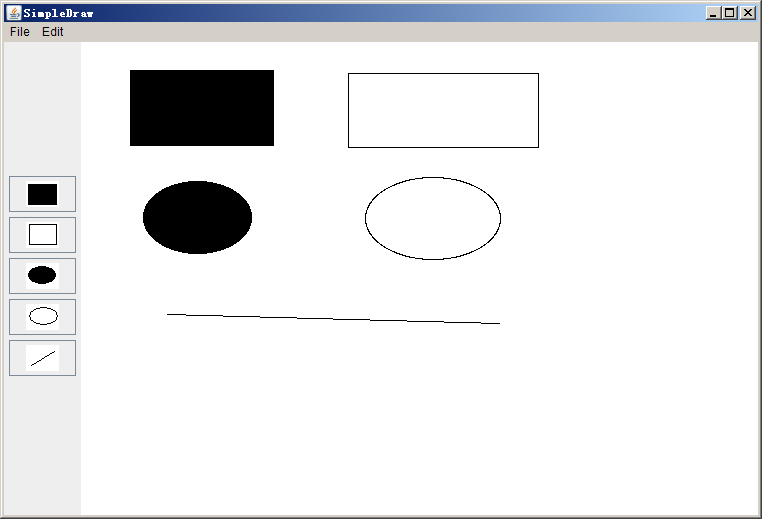
创建一个简单的绘图程序,可以绘制矩形,椭圆和直线。
1.先生成程序界面:
创一个添加显示图片按钮的方法:
1 privateJButton addButton(String str){2 ImageIcon icon = new ImageIcon(str);//按钮图标
3 JButton button = newJButton(icon);4 button.setContentAreaFilled(false);//按钮透明;
5 returnbutton;6 }
初始化界面:
1 public voidinit(){2 setLayout(new BorderLayout(5,1)); //设置布局;
3 JButton rectFilled = addButton("rectfilled.gif");4 rectFilled.setActionCommand("rectFilled");5 JButton rect = addButton("rect.gif");6 rect.setActionCommand("rect");7 JButton ovalFilled = addButton("ovalfilled.gif");8 ovalFilled.setActionCommand("ovalFilled");9 JButton oval = addButton("oval.gif");10 oval.setActionCommand("oval");11 JButton line = addButton("line.gif");12 line.setActionCommand("line");13 add(rectFilled, BorderLayout.WEST);14 add(rect, BorderLayout.WEST);15 add(ovalFilled, BorderLayout.WEST);16 add(oval, BorderLayout.WEST);17 add(line, BorderLayout.WEST);18 }
2.创建按钮事件
点击按钮分别执行的事件;为了点击按钮画出相应的图形,我设置了5个boolean变量;
private boolean isDrawRectFilled = false, isDrawRect = false, isDrawOvalFilled = false, isDrawOval = false, isDrawLine = false;
按钮事件代码:
1 public voidactionPerformed(ActionEvent e){2 String cmd =e.getActionCommand();3 if(cmd.equals("rectFilled")){4 isDrawRectFilled = true;5 isDrawRect = false;6 isDrawOval = false;7 isDrawOvalFilled = false;8 isDrawLine = false;9 } else if (cmd.equals("rect")){10 isDrawRect = true;11 isDrawRectFilled = false;12 isDrawOval = false;13 isDrawOvalFilled = false;14 isDrawLine = false;15 } else if (cmd.equals("ovalFilled")){16 isDrawRectFilled = false;17 isDrawRect = false;18 isDrawOval = false;19 isDrawOvalFilled = true;20 isDrawLine = false;21 } else if (cmd.equals("oval")){22 isDrawRectFilled = false;23 isDrawRect = false;24 isDrawOval = true;25 isDrawOvalFilled = false;26 isDrawLine = false;27 } else if (cmd.equals("line")){28 isDrawRectFilled = false;29 isDrawRect = false;30 isDrawOval = false;31 isDrawOvalFilled = false;32 isDrawLine = true;33 }34 }
分别将所需要画出的图形设为true,将其他设置为false;
3.主要的部分:鼠标点击和拖拽,画出相应的图形:
(1)先定义一个GPiont 变量用于储存鼠标按下的位置:
private GPoint press; //记录鼠标按下的点;
(2)分别创建储存相应图形的变量;
private GLine line;
private GRect rect;
private GOval oval;
(3)画矩形和画椭圆的代码类似;
分别设置他们的坐标和宽和高:
double x = press.getX();
double y = press.getY();
double width = e.getX() - press.getX();
double height = e.getY() - press.getY();
同时位置确保在每个方向都能画出图形,需要设置
//确保向左下方拖拽也能画出图形;
if(width < 0 ){
x = e.getX();
width = -width;
}
//确保向上方拖拽也能画出图形;
if(height < 0){
y = e.getY();
height = -height;
}
(4)画直线比较简单:
鼠标点击事件中加入一个:
line = new GLine(e.getX(), e.getY(),e.getX(), e.getY());
在鼠标拖拽事件中设置终点:
line.setEndPoint(e.getX(),e.getY());
4.同时要允许可以拖动画出的图形:
设置一个GObject 变量,储存鼠标按下点的图形,如果不是null则拖动当前图形不是绘画。
1 if(gobj != null){2 gobj.move(e.getX() - press.getX(), e.getY() -press.getY());3 press = newGPoint(e.getPoint());4 }
5.鼠标点击图形将其移动到最前
if(gobj != null){
gobj.sendToFront();
}
最后的效果:
完整代码:
1 import acm.graphics.*;2 import acm.program.*;3
4 import java.awt.*;5 import java.awt.event.*;6
7 import acm.gui.*;8 import javax.swing.*;9
10 public class SimpleDraw extendsGraphicsProgram {11 //初始化界面
12 public voidinit(){13 setLayout(new BorderLayout(5,1)); //设置布局;
14 JButton rectFilled = addButton("rectfilled.gif");15 rectFilled.setActionCommand("rectFilled");16 JButton rect = addButton("rect.gif");17 rect.setActionCommand("rect");18 JButton ovalFilled = addButton("ovalfilled.gif");19 ovalFilled.setActionCommand("ovalFilled");20 JButton oval = addButton("oval.gif");21 oval.setActionCommand("oval");22 JButton line = addButton("line.gif");23 line.setActionCommand("line");24 add(rectFilled, BorderLayout.WEST);25 add(rect, BorderLayout.WEST);26 add(ovalFilled, BorderLayout.WEST);27 add(oval, BorderLayout.WEST);28 add(line, BorderLayout.WEST);29 addActionListeners();30 addMouseListeners();31 }32 /*
33 * 添加按钮方法,str 是显示的图片的路径;34 */
35 privateJButton addButton(String str){36 ImageIcon icon = new ImageIcon(str);//按钮图标
37 JButton button = newJButton(icon);38 button.setContentAreaFilled(false);//按钮透明;
39 returnbutton;40 }41 /*侦听的按钮事件*/
42 public voidactionPerformed(ActionEvent e){43 String cmd =e.getActionCommand();44 if(cmd.equals("rectFilled")){45 isDrawRectFilled = true;46 isDrawRect = false;47 isDrawOval = false;48 isDrawOvalFilled = false;49 isDrawLine = false;50 } else if (cmd.equals("rect")){51 isDrawRect = true;52 isDrawRectFilled = false;53 isDrawOval = false;54 isDrawOvalFilled = false;55 isDrawLine = false;56 } else if (cmd.equals("ovalFilled")){57 isDrawRectFilled = false;58 isDrawRect = false;59 isDrawOval = false;60 isDrawOvalFilled = true;61 isDrawLine = false;62 } else if (cmd.equals("oval")){63 isDrawRectFilled = false;64 isDrawRect = false;65 isDrawOval = true;66 isDrawOvalFilled = false;67 isDrawLine = false;68 } else if (cmd.equals("line")){69 isDrawRectFilled = false;70 isDrawRect = false;71 isDrawOval = false;72 isDrawOvalFilled = false;73 isDrawLine = true;74 }75 }76 public voidmousePressed(MouseEvent e){77 press = newGPoint(e.getPoint());78 gobj =getElementAt(press);79 if(gobj != null){80 gobj.sendToFront();81 }82 line = newGLine(e.getX(), e.getY(),e.getX(), e.getY());83 rect = new GRect(0,0);84 oval = new GOval(0,0);85 }86 //鼠标拖拽事件
87 public voidmouseDragged(MouseEvent e){88 double x =press.getX();89 double y =press.getY();90 double width = e.getX() -press.getX();91 double height = e.getY() -press.getY();92 line.setEndPoint(e.getX(),e.getY());93 //确保向左下方拖拽也能画出图形;
94 if(width < 0){95 x =e.getX();96 width = -width;97 }98 //确保向上方拖拽也能画出图形;
99 if(height < 0){100 y =e.getY();101 height = -height;102 }103 rect.setSize(width, height);104 oval.setSize(width, height);105 if(gobj != null){106 gobj.move(e.getX() - press.getX(), e.getY() -press.getY());107 press = newGPoint(e.getPoint());108 } else{109 if(isDrawRectFilled == true){110 rect.setFilled(true);111 add(rect, x, y);112 }113 if(isDrawRect == true){114 add(rect, x, y);115 }116 if(isDrawOval == true){117 add(oval, x, y);118 }119 if(isDrawOvalFilled == true){120 oval.setFilled(true);121 add(oval, x, y);122 }123 if(isDrawLine == true){124 add(line);125 }126 }127 }128
129 private boolean isDrawRectFilled = false, isDrawRect = false, isDrawOvalFilled = false, isDrawOval = false, isDrawLine = false;130 privateGLine line;131 privateGRect rect;132 privateGOval oval;133 private GPoint press; //记录鼠标按下的点;
134 private GObject gobj; //记录鼠标按下点的图形;
135 }
上一篇:用java写一个简单的画图板
下一篇:第一个简单的Java程序
知识阅读





软件推荐
更多 >-
 查看
查看计支宝app下载v3.1.29 安卓版
142.27MB |商务办公
-
 查看
查看小小优酷最新版下载v5.4.6 安卓官方版
68.11MB |影音播放
-
 查看
查看艺图语app下载v3.3.4 安卓免费版
34.33MB |系统工具
-
查看
爱鸽者手机版下载v3.2.9 安卓版
243.57MB |商务办公
-
 查看
查看一品威客网接单app(一品众包)下载v2.7.1 安卓最新版
55.01MB |商务办公
-
 查看
查看诸葛找房网官方版下载v4.8.1.1 安卓最新版
66.6MB |生活服务
-
 查看
查看皓盘云建最新版下载v9.0 安卓版
53.38MB |商务办公
-
 查看
查看ris云客移动销售系统最新版下载v1.1.25 安卓手机版
42.71M |商务办公



-
1

-
2
葫芦侠三楼最新破解版下载v4.4.0.6 安卓版
其它手游 -
3
葫芦侠7楼破解版免费下载v4.4.0.6安卓最新版
其它手游 -
4
葫芦侠八楼免费版下载v4.4.0.6安卓版
其它手游 -
5
葫芦侠3楼破解版免费下载v4.4.0.6安卓手机版
其它手游 -
6
像素漫斗抱歉,“八神庵”是特指游戏角色的专有名词,不存在符合要求的常用同义词近义词。下载v1.00安卓版
其它手游 -
7
葫芦侠4楼破解版游戏修改器下载v4.4.0.6安卓免费版
其它手游 -
8
末日餐厅安卓版下载v1.35安卓版
其它手游 -
9
葫芦侠十楼免费破解版下载v4.4.0.6安卓版
其它手游 -
10
葫芦侠8楼最新破解版下载v4.4.0.6安卓版
其它手游