【组件化开发】前端进阶篇之如何编写可维护可升级的代码
发表时间:2022-03-25来源:网络
前言
我还在携程的做业务的时候,每个看似简单的移动页面背后往往会隐藏5个以上的数据请求,其中最过复杂的当属机票与酒店的订单填写业务代码
这里先看看比较“简单”的机票代码:
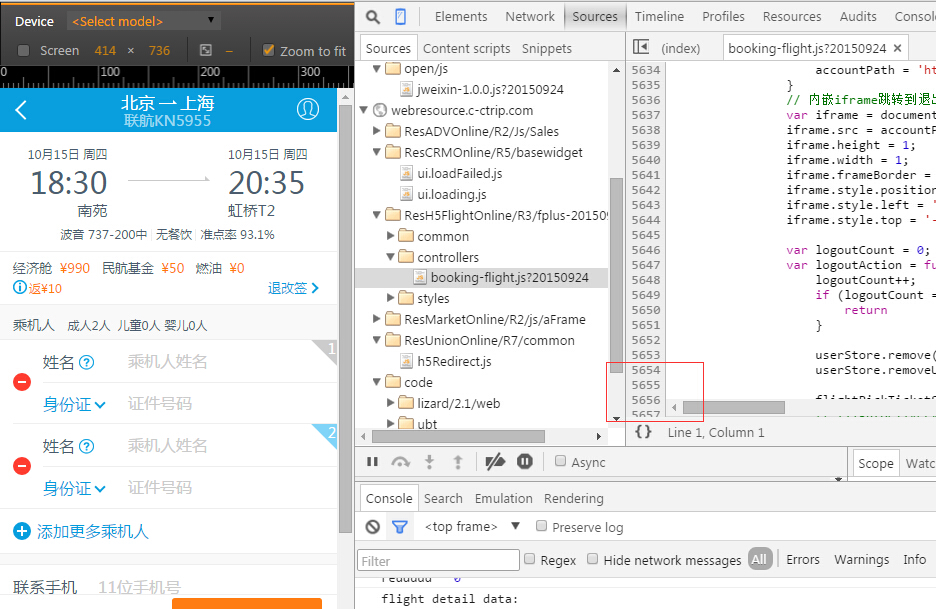
然后看看稍微复杂的酒店业务逻辑:

机票一个页面的代码量达到了5000行代码,而酒店的代码竟然超过了8000行,这里还不包括模板(html)文件!!!
然后初略看了机票的代码,就该页面可能发生的接口请求有19个之多!!!而酒店的的交互DOM事件基本多到了令人发指的地步:

当然,机票团队的交互DOM事件已经多到了我笔记本不能截图了:

 1 events: {
2 'click .js_check_invoice_type': 'checkInvoiceType', //切换发票类型
3 'click .flight-hxtipshd': 'huiXuanDesc', //惠选说明
4 'click .js_ListReload': 'hideNetError',
5 'click #js_return': 'backAction', //返回列表页
6 'click div[data-rbtType]': 'showRebate', //插烂返现说明
7 'click #paybtn .j_btn': 'beforePayAction', //提交订单 //flightDetailsStore, passenger, mdStore, postAddressStorage, userStore, flightDeliveryStore
8 'click .flight-loginbtn2': 'bookLogin', //登录
9 'input #linkTel': 'setContact', //保存用户输入的联系人
10 'click #addPassenger .flight-labq': 'readmeAction',//姓名帮助
11 'click .jsDelivery': 'selDelivery', //选择配送方式
12 'click #jsViewCoupons': 'viewCoupons', //查看消费券使用说明 //flightDetailsStore
13 // 'click .j_refundPolicy': 'fanBoxAction', //查看返现信息
14 //'click .flight-bkinfo-tgq .f-r': 'tgBoxAction', //查看退改签
15 'click .js_del_tab': 'showDelListUI', //配送方式
16 // 'click .js_del_cost .flight-psf i': 'selectPaymentType', // 选择快递费用方式
17 'click #js_addrList': 'AddrListAction', //选择地址
18 'click #date-picker': 'calendarAction', //取票日期 //airportDeliveryStore
19 'click #done-address': 'z', //取票柜台
20 'click #selectCity': 'selectCityAction', //选择城市
21 'click #date-zqtime': 'showZ', //取票时间 //airportDeliveryStore
22 'click #jsinsure': 'viewInsure', //保险说明
23 'click #js_invoice_title': 'inTitleChangeWrp', //发票抬头更改 // userStore, flightOrderInfoInviceStore, flightOrderStore //don't move outside
24 'click #js_invoice_title_div': 'inTitleChangeWrp',
25 'click .flight-icon-arrrht': 'showinTitleList', //‘+’号,跳转发票抬头列表 //userStore, invoiceURLStore
26 'focusin #linkTel': 'telInput',
27 'focusout #linkTel': 'telInputFinish',
28 'touchstart input': 'touchStartAction', // 处理Android手机上点击不灵敏问题
29 'click #package .flight-arrrht': 'packageSelect',
30 'focusin input': 'hideErrorTips',
31 'click #dist_text_div': 'hideErrorTips',
32 'click .j_PackageNotice': 'toggletips',
33 'click .j_AnnouncementNotice': 'toggleNotice',
34 'click #travalPackageDesc': 'forwardToTravalPackage', //don't move into child modules
35 'click #airInsureDesc': 'showAirInsureDesc',
36 'click #paybtn': 'orderDetailAction',//价格明细
37 'click .J_retriveVerifyCodeBtn': 'getVerifyCode',
38 'click .J_toPay': 'toPayAction',
39 'click .J_closeVerifyCode': 'closeVerifyCodePopup',
40 'keyup .J_verifyCodePopup input': 'setToPayBtnStatus',
41 'click .js_flight_seat': 'selectRecommendCabin', // 选择推荐仓位
42 'click .j_changeFlight': 'changeFlightAction', // 推荐航班弹层中更改航班
43 'focusin input:not([type=tel])': 'adjustInputPosition', // iphone5/5s ios8搜狗输入法遮住input
44 'click .js_addr,#js_addr_div': 'editDeliverAddress',//报销凭证,详细地址编辑
45 'click .js_showUserInfo': 'showUserInfo', // add by hkhu v2.5.9
46 'click #logout': 'logout', // add by hkhu v2.5.9
47 'click #gotoMyOrder': 'gotoMyOrder', // add by hkhu v2.5.9
48 'touchstart #logout': function (e) { $(e.currentTarget).addClass('current'); },
49 'touchstart #gotoMyOrder': function (e) { $(e.currentTarget).addClass('current'); },
50 'click .js_buddypayConfirm': 'buddypayConfirmed',
51 'click .js_pickupTicket': 'viewPickUp', //261接送机券说明
52 'click .flt-bking-logintips': 'closelogintips'//关闭接送机券提示
53 },
View Code
1 events: {
2 'click .js_check_invoice_type': 'checkInvoiceType', //切换发票类型
3 'click .flight-hxtipshd': 'huiXuanDesc', //惠选说明
4 'click .js_ListReload': 'hideNetError',
5 'click #js_return': 'backAction', //返回列表页
6 'click div[data-rbtType]': 'showRebate', //插烂返现说明
7 'click #paybtn .j_btn': 'beforePayAction', //提交订单 //flightDetailsStore, passenger, mdStore, postAddressStorage, userStore, flightDeliveryStore
8 'click .flight-loginbtn2': 'bookLogin', //登录
9 'input #linkTel': 'setContact', //保存用户输入的联系人
10 'click #addPassenger .flight-labq': 'readmeAction',//姓名帮助
11 'click .jsDelivery': 'selDelivery', //选择配送方式
12 'click #jsViewCoupons': 'viewCoupons', //查看消费券使用说明 //flightDetailsStore
13 // 'click .j_refundPolicy': 'fanBoxAction', //查看返现信息
14 //'click .flight-bkinfo-tgq .f-r': 'tgBoxAction', //查看退改签
15 'click .js_del_tab': 'showDelListUI', //配送方式
16 // 'click .js_del_cost .flight-psf i': 'selectPaymentType', // 选择快递费用方式
17 'click #js_addrList': 'AddrListAction', //选择地址
18 'click #date-picker': 'calendarAction', //取票日期 //airportDeliveryStore
19 'click #done-address': 'z', //取票柜台
20 'click #selectCity': 'selectCityAction', //选择城市
21 'click #date-zqtime': 'showZ', //取票时间 //airportDeliveryStore
22 'click #jsinsure': 'viewInsure', //保险说明
23 'click #js_invoice_title': 'inTitleChangeWrp', //发票抬头更改 // userStore, flightOrderInfoInviceStore, flightOrderStore //don't move outside
24 'click #js_invoice_title_div': 'inTitleChangeWrp',
25 'click .flight-icon-arrrht': 'showinTitleList', //‘+’号,跳转发票抬头列表 //userStore, invoiceURLStore
26 'focusin #linkTel': 'telInput',
27 'focusout #linkTel': 'telInputFinish',
28 'touchstart input': 'touchStartAction', // 处理Android手机上点击不灵敏问题
29 'click #package .flight-arrrht': 'packageSelect',
30 'focusin input': 'hideErrorTips',
31 'click #dist_text_div': 'hideErrorTips',
32 'click .j_PackageNotice': 'toggletips',
33 'click .j_AnnouncementNotice': 'toggleNotice',
34 'click #travalPackageDesc': 'forwardToTravalPackage', //don't move into child modules
35 'click #airInsureDesc': 'showAirInsureDesc',
36 'click #paybtn': 'orderDetailAction',//价格明细
37 'click .J_retriveVerifyCodeBtn': 'getVerifyCode',
38 'click .J_toPay': 'toPayAction',
39 'click .J_closeVerifyCode': 'closeVerifyCodePopup',
40 'keyup .J_verifyCodePopup input': 'setToPayBtnStatus',
41 'click .js_flight_seat': 'selectRecommendCabin', // 选择推荐仓位
42 'click .j_changeFlight': 'changeFlightAction', // 推荐航班弹层中更改航班
43 'focusin input:not([type=tel])': 'adjustInputPosition', // iphone5/5s ios8搜狗输入法遮住input
44 'click .js_addr,#js_addr_div': 'editDeliverAddress',//报销凭证,详细地址编辑
45 'click .js_showUserInfo': 'showUserInfo', // add by hkhu v2.5.9
46 'click #logout': 'logout', // add by hkhu v2.5.9
47 'click #gotoMyOrder': 'gotoMyOrder', // add by hkhu v2.5.9
48 'touchstart #logout': function (e) { $(e.currentTarget).addClass('current'); },
49 'touchstart #gotoMyOrder': function (e) { $(e.currentTarget).addClass('current'); },
50 'click .js_buddypayConfirm': 'buddypayConfirmed',
51 'click .js_pickupTicket': 'viewPickUp', //261接送机券说明
52 'click .flt-bking-logintips': 'closelogintips'//关闭接送机券提示
53 },
View Code
就这种体量的页面,如果需要迭代需求、打BUG补丁的话,我敢肯定的说,一个BUG的修复很容易引起其它BUG,而上面还仅仅是其中一个业务页面,后面还有强大而复杂的前端框架呢!如此复杂的前端代码维护工作可不是开玩笑的!
PS:说道此处,不得不为携程的前端水平点个赞,业内少有的单页应用,一套代码H5&Hybrid同时运行不说,还解决了SEO问题,嗯,很赞。
如何维护这种页面,如何设计这种页面是我们今天讨论的重点,而上述是携程合并后的代码,他们两个团队的设计思路不便在此处展开。
今天,我这里提供一个思路,认真阅读此文可能在以下方面对你有所帮助:
1 ① 如何将一个复杂的页面拆分为一个个独立的页面组件模块 2 ② 如何将分拆后的业务组件模块重新合为一个完整的页面 3 ③ 从重构角度看组件化开发带来的好处4 ④ 从前端优化的角度看待组件化开发
文中是我个人的一些框架&业务开发经验,希望对各位有用,也希望各位多多支持讨论,指出文中不足以及提出您的一些建议。
由于该项目涉及到了项目拆分与合并,基本属于一个完整的前端工程化案例了,所以将之放到了github上:https://github.com/yexiaochai/mvc
其中工程化一块的代码,后续会由另一位小伙伴持续更新,如果该文对各位有所帮助的话请各位给项目点个赞、加颗星:)
我相信如果是中级水平的前端,认真阅读此文一定会对你有一点帮助滴。
一个实际的场景
演示地址
http://yexiaochai.github.io/mvc/webapp/bus/list.html
代码仓促,可能会有BUG哦:)
代码地址:https://github.com/yexiaochai/mvc/
页面基本构成
因为订单填写页一般有密度,我这里挑选相对复杂而又没有密度的产品列表页来做说明,其中框架以及业务代码已经做过抽离,不会包含敏感信息,一些优化后续会同步到开源blade框架中去。
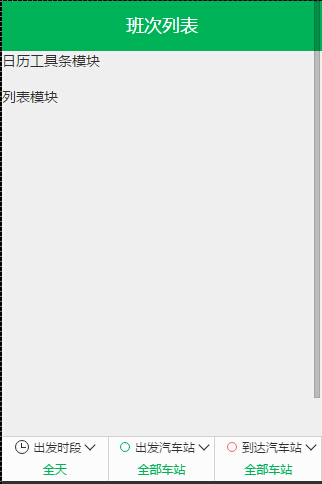
我们这里列表页的首屏页面如下:

简单来说组成如下:
① 框架级别UI组件UIHeader,头部组件
② 点击日期会出框架级别UI,日历组件UICalendar
③ 点击出发时段、出发汽车站、到达汽车站,皆会出框架级别UI
④ header下面的日期工具栏需要作为独立的业务模块
⑤ 列表区域可以作为独立的业务模块,但是与主业务靠太近,不太适合
⑥ 出发时段、出发汽车站、到达汽车站皆是独立的业务模块
一个页面被我们拆分成了若干个小模块,我们只需要关注模块内部的交互实现,而包括业务模块的通信,业务模块的样式,业务模块的重用,暂时有以下约定:
① 单个页面的样式全部写在一个文件中,比如list里面所有模块对应的是list.css ② 模块之间采用观察者模式观察数据实体变化,以数据为媒介通信 ③ 一般来说业务模块不可重用,如果有重用的模块,需要分离到common目录中,因为我们今天不考虑common重用,这块暂时不予理睬这里有些朋友可能认为单个模块的CSS以及image也应该参与独立,我这里不太同意,业务页面样式粒度太细的话会给设计带来不小的麻烦,这里再以通俗的话来说:尼玛,我CSS功底一般,拆分的太细,对我来说难度太高......
不好的做法
不好的这个事情其实是相对的,因为不好的做法一般是比较简单的做法,对于一次性项目或者业务比较简单的页面来说反而是好的做法,比如这里的业务逻辑可以这样写:
1 define(['AbstractView', 'list.layout.html', 'list.html', 'BusModel', 'BusStore', 'UICalendarBox', 'UILayerList', 'cUser', 'UIToast'], 2 function (AbstractView, layoutHtml, listTpl, BusModel, BusStore, UICalendarBox, UILayerList, cUser, UIToast) { 3 return _.inherit(AbstractView, { 4 propertys: function ($super) { 5 $super(); 6 //一堆基础属性定义 7 //...... 8 //交互业务逻辑 9 this.events = { 10 'click .js_pre_day': 'preAction', //点击前一天触发 11 'click .js_next_day': 'nextAction', //点击后一天触发 12 'click .js_bus_list li': 'toBooking', //点击列表项目触发 13 'click .js_show_calendar': 'showCalendar', //点击日期项出日历组件 14 'click .js_show_setoutdate': 'showSetoutDate', //筛选出发时段 15 'click .js_show_setstation': 'showStation', //筛选出发站 16 'click .js_show_arrivalstation': 'showArrivalStation', //筛选到达站 17 //迭代需求,增加其它频道入口 18 'click .js-list-tip': function () {} 19 }; 20 }, 21 //初始化头部标题栏 22 initHeader: function (t) { }, 23 //首次dom渲染后,初始化后续会用到的所有dom元素,以免重复获取 24 initElement: function () {}, 25 showSetoutDate: function () {}, 26 showStation: function () {}, 27 showArrivalStation: function () {}, 28 showCalendar: function () {}, 29 preAction: function (e) {}, 30 nextAction: function () {}, 31 toBooking: function (e) {}, 32 listInit: function () {}, 33 bindScrollEvent: function () {}, 34 unbindScrollEvent: function () { }, 35 addEvent: function () { 36 this.on('onShow', function () { 37 //当页面渲染结束,需要做的初始化操作,比如渲染页面 38 this.listInit(); 39 //...... 40 }); 41 this.on('onHide', function () { 42 this.unbindScrollEvent(); 43 }); 44 } 45 }); 46 });根据之前的经验,如果仅仅包含这些业务逻辑,这样写代码问题不是非常大,代码量预计在800行左右,但是为了完成完整的业务逻辑,我们这里马上产生了新的需求。
需求迭代
因为我这里的班次列表,最初是没有URL参数,所以根本无法产出班次列表,页面上所有组件模块都是摆设,于是这里新增一个需求:
当url没有出发-到达相关参数信息时,默认弹出出发城市到达城市选择框于是,我们这里会新增一个简单的弹出层:
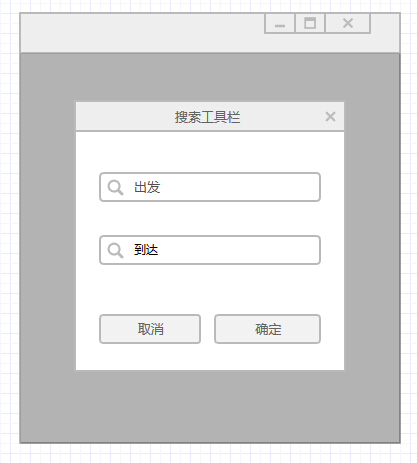
这个看似简单的弹出层,背后却隐藏了一个巨大的陷阱,因为点击出发或者到达时会出城市列表,而城市列表本身就是一个比较复杂的业务:

于是页面的组成发生了改变:
① 本身业务逻辑约800行代码
② 新增出发到达筛选弹出层
③ 出发城市页面,预计300行代码
而弹出层的新增对业务本身造成了深远的影响,本来url是不带有业务参数的,但是点击了弹出层的确定按钮,需要改变URL参数,并且刷新本身页面的数据,于是简单的一个弹出层新增直接将页面的复杂程度提升了一倍。
于是该页面代码轻轻松松破千了,后续需求迭代js代码量破2000仅仅是时间问题,到时候维护便复杂了,页面复杂无规律的DOM操作将会令你焦头烂额,这个时候组件化开发的优势便得以体现了,于是下面进入组件化开发的设计。
准备工作
总体架构
这次的代码依赖于blade骨架,包括:
① MVC模块,完成通过url获取正确的page控制器,从而通过view.js完成渲染页面的功能
② 数据请求模块,完成接口请求
全站依赖于javascript的继承功能,详情见:【一次面试】再谈javascript中的继承,如果不太了解面向对象编程,文中代码可能会有点吃力,也请各位多多了解。
总体业务架构如图:

框架架构图:
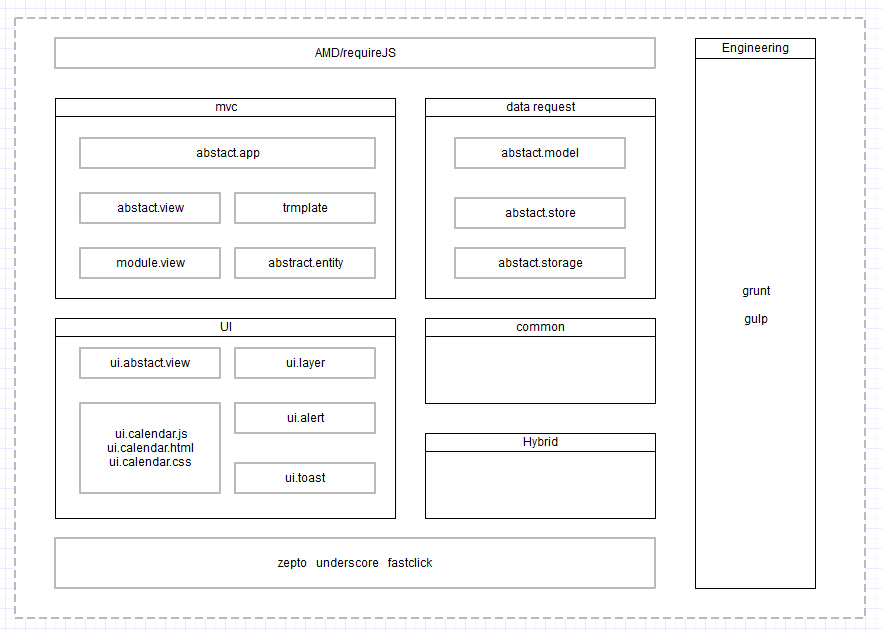
下面分别介绍下各个模块,帮助各位在下文中能更好的了解代码,首先是基本MVC的介绍,这里请参考我这篇文章:简单的MVC介绍
全局控制器
其实控制器可谓是变化万千的一个对象,对于服务器端来说,控制器完成的功能是将本次请求分发到具体的代码模块,由代码模块处理后返回字符串给前端;
对于请求已经来到浏览器的前端来说,根据这次请求URL(或者其它判断条件),判断该次请求应该由哪个前端js控制器执行,这是前端控制器干的事情;
当真的这次处理逻辑进入一个具体的page后,这个page事实上也可以作为一个控制器存在......
我们这里的控制器,主要完成根据当前请求实例化View的功能,并且会提供一些view级别希望单例使用的接口:
1 define([
2 'UIHeader',
3 'UIToast',
4 'UILoading',
5 'UIPageView',
6 'UIAlert'
7 ], function (UIHeader, UIToast, UILoading, UIPageView, UIAlert) {
8
9 return _.inherit({
10 propertys: function () {
11 //view搜索目录
12 this.viewRootPath = 'views/';
13
14 //默认view
15 this.defaultView = 'index';
16
17 //当前视图路径
18 this.viewId;
19 this.viewUrl;
20
21 //视图集
22 this.views = {};
23
24 //是否开启单页应用
25 // this.isOpenWebapp = _.getHybridInfo().platform == 'baidubox' ? true : false;
26 this.isOpenWebapp = false;
27
28 this.viewMapping = {};
29
30 //UIHeader需要释放出来
31 this.UIHeader = UIHeader;
32
33 this.interface = [
34 'forward',
35 'back',
36 'jump',
37 'showPageView',
38 'hidePageView',
39 'showLoading',
40 'hideLoading',
41 'showToast',
42 'hideToast',
43 'showMessage',
44 'hideMessage',
45 'showConfirm',
46 'hideConfirm',
47 'openWebapp',
48 'closeWebapp'
49 ];
50
51 },
52
53 initialize: function (options) {
54 this.propertys();
55 this.setOption(options);
56 this.initViewPort();
57 this.initAppMapping();
58
59 //开启fastclick
60 $.bindFastClick && $.bindFastClick();
61
62 },
63
64 setOption: function (options) {
65 _.extend(this, options);
66 },
67
68 //创建dom结构
69 initViewPort: function () {
70
71 this.d_header = $('#headerview');
72 this.d_state = $('#js_page_state');
73 this.d_viewport = $('#main');
74
75 //实例化全局使用的header,这里好像有点不对
76 this.header = new this.UIHeader({
77 wrapper: this.d_header
78 });
79
80 //非共享资源,这里应该引入app概念了
81 this.pageviews = {};
82 this.toast = new UIToast();
83 this.loading = new UILoading();
84 this.alert = new UIAlert();
85 this.confirm = new UIAlert();
86 },
87
88 openWebapp: function () {
89 this.isOpenWebapp = true;
90 },
91
92 closeWebapp: function () {
93 this.isOpenWebapp = false;
94 },
95
96 showPageView: function (name, _viewdata_, id) {
97 var view = null, k, scope = this.curViewIns || this;
98 if (!id) id = name;
99 if (!_.isString(name)) return;
100 // for (k in _viewdata_) {
101 // if (_.isFunction(_viewdata_[k])) _viewdata_[k] = $.proxy(_viewdata_[k], scope);
102 // }
103 view = this.pageviews[id];
104 var arr = name.split('/');
105 var getViewPath = window.getViewPath || window.GetViewPath;
106 if (!view) {
107 view = new UIPageView({
108 // bug fixed by zzx
109 viewId: arr[arr.length - 1] || name,
110 viewPath: getViewPath ? getViewPath(name) : name,
111 _viewdata_: _viewdata_,
112 onHide: function () {
113 scope.initHeader();
114 }
115 });
116 this.pageviews[id] = view;
117 } else {
118 view.setViewData(_viewdata_);
119 }
120 view.show();
121
122 },
123
124 hidePageView: function (name) {
125 if (name) {
126 if (this.pageviews[name]) this.pageviews[name].hide();
127 } else {
128 for (var k in this.pageviews) this.pageviews[k].hide();
129 }
130 },
131
132 showLoading: function () {
133 this.loading.show();
134 },
135
136 hideLoading: function () {
137 this.loading.hide();
138 },
139
140 showToast: function (msg, callback) {
141 this.toast.resetDefaultProperty();
142 this.toast.content = msg;
143 if (callback) this.toast.hideAction = callback;
144 this.toast.refresh();
145 this.toast.show();
146 },
147
148 hideToast: function () {
149 this.toast.hide();
150 },
151
152 showMessage: function (param) {
153 if (_.isString(param)) {
154 param = { content: param };
155 }
156
157 this.alert.resetDefaultProperty();
158 this.alert.setOption(param);
159 this.alert.refresh();
160 this.alert.show();
161 },
162
163 hideMessage: function () {
164 this.alert.hide();
165 },
166
167 showConfirm: function (params) {
168 if (!params) params = {};
169 if (typeof params == 'string') {
170 params = {
171 content: params
172 };
173 }
174
175 this.confirm.resetDefaultProperty();
176
177 //与showMessage不一样的地方
178 this.confirm.btns = [
179 { name: '取消', className: 'cm-btns-cancel js_cancel' },
180 { name: '确定', className: 'cm-btns-ok js_ok' }
181 ];
182 this.confirm.setOption(params);
183 this.confirm.refresh();
184 this.confirm.show();
185 },
186
187 hideConfirm: function () {
188 this.confirm.hide();
189 },
190
191 //初始化app
192 initApp: function () {
193
194 //首次加载不需要走路由控制
195 this.loadViewByUrl();
196
197 //后面的加载全部要经过路由处理
198 if (this.isOpenWebapp === true)
199 $(window).on('popstate.app', $.proxy(this.loadViewByUrl, this));
200
201 },
202
203 loadViewByUrl: function (e) {
204 this.hidePageView();
205
206 var url = decodeURIComponent(location.href).toLowerCase();
207 var viewId = this.getViewIdRule(url);
208
209 viewId = viewId || this.defaultView;
210 this.viewId = viewId;
211 this.viewUrl = url;
212 this.switchView(this.viewId);
213
214 },
215
216 //@override
217 getViewIdRule: function (url) {
218 var viewId = '', hash = '';
219 var reg = /webapp\/.+\/(.+)\.html/;
220
221 var match = url.match(reg);
222 if (match && match[1]) viewId = match[1];
223
224 return viewId;
225 },
226
227 //@override
228 setUrlRule: function (viewId, param, replace, project) {
229 var reg = /(webapp\/.+\/)(.+)\.html/;
230 var url = window.location.href;
231 var match = url.match(reg);
232 var proj = project ? 'webapp/' + project : match[1];
233 var preUrl = '', str = '', i = 0, _k, _v;
234 //这里这样做有点过于业务了 *bug*
235 var keepParam = [
236 'us'
237 ], p;
238 if (!viewId) return;
239 if (!match || !match[1]) {
240 preUrl = url + '/webapp/bus/' + viewId + '.html';
241 } else {
242 preUrl = url.substr(0, url.indexOf(match[1])) + proj + viewId + '.html'; ;
243 }
244
245 //特定的参数将会一直带上去,渠道、来源等标志
246 for (i = 0; i < keepParam.length; i++) {
247 p = keepParam[i];
248 if (_.getUrlParam()[p]) {
249 if (!param) param = {};
250 param[p] = _.getUrlParam()[p];
251 }
252 }
253
254 i = 0;
255
256 for (k in param) {
257 _k = encodeURIComponent(_.removeAllSpace(k));
258 _v = encodeURIComponent(_.removeAllSpace(param[k]));
259 if (i === 0) {
260 str += '?' + _k + '=' + _v;
261 i++;
262 } else {
263 str += '&' + _k + '=' + _v;
264 }
265 }
266
267 url = preUrl + str;
268
269 if (this.isOpenWebapp === false) {
270 window.location = url;
271 return;
272 }
273
274 if (replace) {
275 history.replaceState('', {}, url);
276 } else {
277 history.pushState('', {}, url);
278 }
279
280 },
281
282 switchView: function (id) {
283
284 var curView = this.views[id];
285
286 //切换前的当前view,马上会隐藏
287 var tmpView = this.curView;
288
289 if (tmpView && tmpView != curView) {
290 this.lastView = tmpView;
291 }
292
293 //加载view样式,权宜之计
294 // this.loadViewStyle(id);
295
296 //如果当前view存在,则执行请onload事件
297 if (curView) {
298
299 //如果当前要跳转的view就是当前view的话便不予处理
300 //这里具体处理逻辑要改*************************************
301 if (curView == this.curView) {
302 return;
303 }
304
305 this.curView = curView;
306 this.curView.show();
307 this.lastView && this.lastView.hide();
308 } else {
309
310 // this.showLoading();
311 this.loadView(id, function (View) {
312 //每次加载结束将状态栏隐藏,这个代码要改
313 // this.hideLoading();
314
315 this.curView = new View({
316 viewId: id,
317 refer: this.lastView ? this.lastView.viewId : null,
318 APP: this,
319 wrapper: this.d_viewport
320 });
321
322 //设置网页上的view标志
323 this.curView.$el.attr('page-url', id);
324
325 //保存至队列
326 this.views[id] = this.curView;
327
328 this.curView.show();
329 this.lastView && this.lastView.hide();
330
331 });
332 }
333 },
334
335 //加载view
336 loadView: function (path, callback) {
337 var self = this;
338 re([this.buildUrl(path)], function (View) {
339 callback && callback.call(self, View);
340 });
341 },
342
343 //override
344 //配置可能会有的路径扩展,为Hybrid与各个渠道做适配
345 initAppMapping: function () {
346 // console.log('该方法必须被重写');
347 },
348
349 //@override
350 buildUrl: function (path) {
351 var mappingPath = this.viewMapping[path];
352 return mappingPath ? mappingPath : this.viewRootPath + '/' + path + '/' + path;
353 },
354
355 //此处需要一个更新逻辑,比如在index view再点击到index view不会有反应,下次改**************************
356 forward: function (viewId, param, replace) {
357 if (!viewId) return;
358 viewId = viewId.toLowerCase();
359
360 this.setUrlRule(viewId, param, replace);
361 this.loadViewByUrl();
362 },
363 jump: function (path, param, replace) {
364 var viewId;
365 var project;
366 if (!path) {
367 return;
368 }
369 path = path.toLowerCase().split('/');
370 if (path.length doctype html>
2
3
4
5
6
7
8
9
10 班次列表
11
12
13
14
15
16 正在加载...
17
18
19
20
21
22
23
24
25
26
27
28
29
30
31
32
33
34
35
36 list.html
list.html
webapp
├─blade //框架目录
│ ├─data
│ ├─libs
│ ├─mvc
│ └─ui
├─bus
│ ├─model //数据请求模块,完全可以使用zepto ajax替换
│ └─pages
│ ├─booking
│ ├─index
│ └─list //demo代码模块
└─static
接下来,让我们真实的开始拆分页面吧。
组件式编程
骨架设计
首先,我们进行最简单的骨架设计,这里依次是其js代码与模板代码:
1 define(['AbstractView', 'text!ListPath/list.css', 'text!ListPath/tpl.layout.html'], function (AbstractView, style, layoutHtml) { 2 return _.inherit(AbstractView, { 3 propertys: function ($super) { 4 $super(); 5 this.style = style; 6 this.template = layoutHtml; 7 }, 8 9 initHeader: function (name) { 10 var title = '班次列表'; 11 this.header.set({ 12 view: this, 13 title: title 14 }); 15 }, 16 17 addEvent: function () { 18 this.on('onShow', function () { 19 console.log('页面渲染结束'); 20 }); 21 } 22 }); 23 });
1
2 日历工具条模块
3
4
5 当前暂无班次可预订
6
7 列表模块
8
9
10 正在加载...
11
12
13
14 出发时段
15
16 全天
17
18
19
20 出发汽车站
21
22 全部车站
23
24
25
26 到达汽车站
27
28 全部车站
29
30
tpl.layout
页面展示如图:
日历工具栏的实现
这里要做的第一步是将日历工具栏模块实现,以数据为先的思考,我们先实现了一个与日历业务有关的数据实体:
1 define(['AbstractEntity'], function (AbstractEntity) {
2
3 var Entity = _.inherit(AbstractEntity, {
4 propertys: function ($super) {
5 $super();
6 var n = new Date();
7 var curTime = new Date(n.getFullYear(), n.getMonth(), n.getDate()).getTime();
8 this.data = {
9 date: curTime,
10 title: '当前日期'
11 };
12 },
13
14 set: function (date) {
15 if (!date) return;
16 if (_.isDate(date)) date = date.getTime();
17 if (typeof date === 'string') date = parseInt(date);
18 this.data.date = date;
19 this.update();
20 },
21
22 getDateStr: function () {
23 var date = new Date();
24 date.setTime(this.data.date);
25 var dateDetail = _.dateUtil.getDetail(date);
26 var name = dateDetail.year + '-' + dateDetail.month + '-' + dateDetail.day + ' ' + dateDetail.weekday + (dateDetail.day1 ? '(' + dateDetail.day1 + ')' : '');
27 return name;
28 },
29
30 nextDay: function () {
31 this.set(this.getDate() + 86400000);
32 return true;
33 },
34
35 getDate: function () {
36 return parseInt(this.data.date);
37 },
38
39 //是否能够再往前一天
40 canPreDay: function () {
41 var n = new Date();
42 var curTime = new Date(n.getFullYear(), n.getMonth(), n.getDate()).getTime();
43
44 //如果当前日期已经是第一天,则不可预订
45 if (curTime 前一天
3
4 后一天
5
搜索工具栏的实现
我们现在的页面,就算不传任何URL参数,已经能渲染出部分页面了,但是下面出发站汽车等业务数据必须等待班次列表数据请求结束才能替换数据,但是这些数据如果没有出发城市和到达城市是不能发起请求的,所以这里先实现搜索工具栏功能:
在出发城市或者到达城市不存在的话便弹出搜索工具栏,引导用户选择城市,这里新增弹出层需要在主页面控制器(检测主控制器)中使用一个UI组件:
1 define([
2 'AbstractView',
3 'text!ListPath/list.css',
4
5 'ListPath/en.date',
6
7
8 'ListPath/mod.date',
9
10 'text!ListPath/tpl.layout.html',
11 'text!ListPath/tpl.search.box.html',
12 'UIScrollLayer'
13 ], function (
14 AbstractView,
15 style,
16
17 DateEntity,
18
19 DateModule,
20
21 layoutHtml,
22 searchBoxHtml,
23 UIScrollLayer
24 ) {
25 return _.inherit(AbstractView, {
26
27 _initEntity: function () {
28 this.dateEntity = new DateEntity();
29 },
30
31 _initModule: function () {
32 this.dateModule = new DateModule({
33 view: this,
34 selector: '.js_calendar_wrapper',
35 dateEntity: this.dateEntity
36 });
37 },
38
39 propertys: function ($super) {
40 $super();
41
42 this._initEntity();
43 this._initModule();
44
45 this.style = style;
46 this.template = layoutHtml;
47 },
48
49 initHeader: function (name) {
50 var title = '班次列表';
51 this.header.set({
52 view: this,
53 title: title,
54 back: function () {
55 console.log('回退');
56 },
57 right: [
58 {
59 tagname: 'search-bar',
60 value: '搜索',
61 callback: function () {
62 console.log('弹出搜索框');
63 this.showSearchBox();
64 }
65 }
66 ]
67 });
68 },
69
70
71
72 //搜索工具弹出层
73 showSearchBox: function () {
74 var scope = this;
75 if (!this.searchBox) {
76 this.searchBox = new UIScrollLayer({
77 title: '请选择搜索条件',
78 html: searchBoxHtml,
79 events: {
80 'click .js-start': function () {
81
82 },
83 'click .js-arrive': function () {
84
85 },
86 'click .js_search_list': function () {
87
88 console.log('查询列表');
89 }
90 }
91 });
92 }
93 this.searchBox.show();
94 },
95
96 addEvent: function () {
97 this.on('onShow', function () {
98 //初始化date数据
99 this.dateModule.initDate();
100
101 //这里判断是否需要弹出搜索弹出层
102 if (!_.getUrlParam().startcityid || !_.getUrlParam().arrivalcityid) {
103 this.showSearchBox();
104 return;
105 }
106
107
108 });
109 }
110 });
111
112 });
list.js
对应搜索弹出层html模板:
1
2
3 出发
4
5 请选择出发地
6
7
8
9 到达
10
11 请选择到达地
12
13
14 查询
15
tpl.search.box.html
这里核心代码是:
1 //搜索工具弹出层 2 showSearchBox: function () { 3 var scope = this; 4 if (!this.searchBox) { 5 this.searchBox = new UIScrollLayer({ 6 title: '请选择搜索条件', 7 html: searchBoxHtml, 8 events: { 9 'click .js-start': function () { 10 11 }, 12 'click .js-arrive': function () { 13 14 }, 15 'click .js_search_list': function () { 16 17 console.log('查询列表'); 18 } 19 } 20 }); 21 } 22 this.searchBox.show(); 23 },于是当URL什么参数都没有的时候,就会弹出这个搜索框
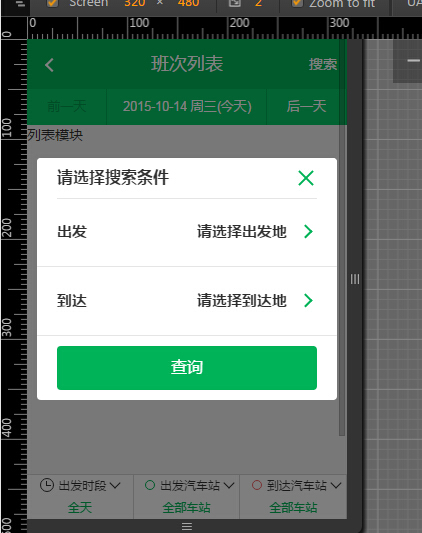
这里也迎来了一个难点,因为城市列表事实上应该是一个独立的可访问的页面,但是这里是想用弹出层的方式调用他,所以我在APP层实现了一个方法可以用弹出层的方式调起一个独立的页面。
注意: 这里city城市列表未完全采用组件化的方式开发,有兴趣的朋友可以自己尝试着开发这里有一个不同的地方是,因为我们点击查询的时候才会做实体数据更新,这里是单纯的做DOM操作了,这里不设置数据实体一个原因就是:
这个搜索弹出层是一个页面级DOM之外的部分,数据实体变化一般只应该影响Page级别的DOM,除非真的有两个页面级View会公用一个数据实体。
1 define([
2 'AbstractView',
3 'text!ListPath/list.css',
4
5 'ListPath/en.date',
6
7
8 'ListPath/mod.date',
9
10 'text!ListPath/tpl.layout.html',
11 'text!ListPath/tpl.search.box.html',
12 'UIScrollLayer'
13 ], function (
14 AbstractView,
15 style,
16
17 DateEntity,
18
19 DateModule,
20
21 layoutHtml,
22 searchBoxHtml,
23 UIScrollLayer
24 ) {
25 return _.inherit(AbstractView, {
26
27 _initEntity: function () {
28 this.dateEntity = new DateEntity();
29
30
31 },
32
33 _initModule: function () {
34 this.dateModule = new DateModule({
35 view: this,
36 selector: '.js_calendar_wrapper',
37 dateEntity: this.dateEntity
38 });
39
40 },
41
42 propertys: function ($super) {
43 $super();
44
45 this._initEntity();
46 this._initModule();
47
48 this.style = style;
49 this.template = layoutHtml;
50
51 //主控制器业务属性
52 this.urlData = {
53 start: {},
54 end: {}
55 };
56
57
58 },
59
60 initHeader: function (name) {
61 var title = '班次列表';
62 this.header.set({
63 view: this,
64 title: title,
65 back: function () {
66 console.log('回退');
67 },
68 right: [
69 {
70 tagname: 'search-bar',
71 value: '搜索',
72 callback: function () {
73 console.log('弹出搜索框');
74 this.showSearchBox();
75 }
76 }
77 ]
78 });
79 },
80
81 //搜索工具弹出层
82 showSearchBox: function () {
83 var scope = this;
84 if (!this.searchBox) {
85 this.searchBox = new UIScrollLayer({
86 title: '请选择搜索条件',
87 html: searchBoxHtml,
88 events: {
89 'click .js-start': function (e) {
90 scope._showCityView('start', $(e.currentTarget));
91 },
92 'click .js-arrive': function (e) {
93 scope._showCityView('end', $(e.currentTarget));
94 },
95 'click .js_search_list': function () {
96 var param = {};
97
98 if (!scope.urlData.start.id) {
99 scope.showToast('请先选择出发城市');
100 return;
101 }
102
103 if (!scope.urlData.end.id) {
104 scope.showToast('请先选择到达城市');
105 return;
106 }
107
108 //这里一定会有出发城市与到达城市等数据
109 param.startcityid = scope.urlData.start.id;
110 param.arrivalcityid = scope.urlData.end.id;
111 param.startdatetime = scope.dateEntity.getDate();
112 param.startname = scope.urlData.start.name;
113 param.arrivename = scope.urlData.end.name;
114
115 if (scope.urlData.start.station) {
116 param.startstationid = scope.urlData.start.station
117 }
118
119 if (scope.urlData.end.station) {
120 param.arrivalstationid = end_station
121 }
122
123 scope.forward('list', param);
124 this.hide();
125 }
126 }
127 });
128 }
129 this.searchBox.show();
130 },
131
132 _showCityView: function (key, el) {
133 var scope = this;
134
135 if (key == 'end') {
136 //因为到达车站会依赖出发车站的数据,所以这里得先做判断
137 if (!this.urlData.start.id) {
138 this.showToast('请先选择出发城市');
139 return;
140 }
141 }
142
143 this.showPageView('city', {
144 flag: key,
145 startId: this.urlData.start.id,
146 type: this.urlData.start.type,
147 onCityItemClick: function (id, name, station, type) {
148 scope.urlData[key] = {};
149 scope.urlData[key]['id'] = id;
150 scope.urlData[key]['type'] = type;
151 scope.urlData[key]['name'] = name;
152 if (station) scope.urlData[key]['name'] = station;
153 el.text(name);
154 scope.hidePageView();
155 },
156 onBackAction: function () {
157 scope.hidePageView();
158 }
159 });
160 },
161
162 addEvent: function () {
163 this.on('onShow', function () {
164 //初始化date数据
165 this.dateModule.initDate();
166
167 //这里判断是否需要弹出搜索弹出层
168 if (!_.getUrlParam().startcityid || !_.getUrlParam().arrivalcityid) {
169 this.showSearchBox();
170 return;
171 }
172
173 });
174 }
175 });
176
177 });
list.js
搜索功能完成后,我们这里便可以进入真正的数据请求功能渲染列表了。
其余模块
在实现数据请求之前,我按照日期模块的方式将下面三个模块的功能也一并完成了,这里唯一不同的是,这些模块的DOM已经存在,我们不需要渲染了,完成后的代码大概是这样的:
1 define([
2 'AbstractView',
3 'text!ListPath/list.css',
4
5 'ListPath/en.station',
6 'ListPath/en.date',
7 'ListPath/en.time',
8
9 'ListPath/mod.date',
10 'ListPath/mod.time',
11 'ListPath/mod.setout',
12 'ListPath/mod.arrive',
13
14 'text!ListPath/tpl.layout.html',
15 'text!ListPath/tpl.search.box.html',
16 'UIScrollLayer'
17 ], function (
18 AbstractView,
19 style,
20
21 StationEntity,
22 DateEntity,
23 TimeEntity,
24
25 DateModule,
26 TimeModule,
27 SetoutModule,
28 ArriveModule,
29
30 layoutHtml,
31 searchBoxHtml,
32 UIScrollLayer
33 ) {
34 return _.inherit(AbstractView, {
35
36 _initEntity: function () {
37 this.dateEntity = new DateEntity();
38
39 this.timeEntity = new TimeEntity();
40 this.timeEntity.subscribe('init', this.renderTime, this);
41 this.timeEntity.subscribe(this.renderTime, this);
42
43 this.setoutEntity = new StationEntity();
44 this.setoutEntity.subscribe('init', this.renderSetout, this);
45 this.setoutEntity.subscribe(this.renderSetout, this);
46
47 this.arriveEntity = new StationEntity();
48 this.arriveEntity.subscribe('init', this.renderArrive, this);
49 this.arriveEntity.subscribe(this.renderArrive, this);
50
51 },
52
53 _initModule: function () {
54 this.dateModule = new DateModule({
55 view: this,
56 selector: '.js_calendar_wrapper',
57 dateEntity: this.dateEntity
58 });
59
60 this.timeModule = new TimeModule({
61 view: this,
62 selector: '.js_show_setoutdate',
63 timeEntity: this.timeEntity
64 });
65
66 this.setOutModule = new SetoutModule({
67 view: this,
68 selector: '.js_show_setstation',
69 setoutEntity: this.setoutEntity
70 });
71
72 this.arriveModule = new ArriveModule({
73 view: this,
74 selector: '.js_show_arrivalstation',
75 arriveEntity: this.arriveEntity
76 });
77
78 },
79
80 propertys: function ($super) {
81 $super();
82
83 this._initEntity();
84 this._initModule();
85
86 this.style = style;
87 this.template = layoutHtml;
88
89 //主控制器业务属性
90 this.urlData = {
91 start: {},
92 end: {}
93 };
94
95
96 },
97
98 initHeader: function (name) {
99 var title = '班次列表';
100 this.header.set({
101 view: this,
102 title: title,
103 back: function () {
104 console.log('回退');
105 },
106 right: [
107 {
108 tagname: 'search-bar',
109 value: '搜索',
110 callback: function () {
111 console.log('弹出搜索框');
112 this.showSearchBox();
113 }
114 }
115 ]
116 });
117 },
118
119 initElement: function () {
120 this.d_list_wrapper = this.$('.js_list_wrapper');
121 this.d_none_data = this.$('.js_none_data');
122
123 this.d_js_show_setoutdate = this.$('.js_show_setoutdate');
124 this.d_js_show_setstation = this.$('.js_show_setstation');
125 this.d_js_show_arrivalstation = this.$('.js_show_arrivalstation');
126 this.d_js_list_loading = this.$('.js_list_loading');
127 this.d_js_tabs = this.$('.js_tabs');
128
129 this.d_js_day_sec = this.$('.js_day_sec');
130 this.d_js_start_sec = this.$('.js_start_sec');
131 this.d_js_arrival_sec = this.$('.js_arrival_sec');
132 },
133
134 //搜索工具弹出层
135 showSearchBox: function () {
136 var scope = this;
137 if (!this.searchBox) {
138 this.searchBox = new UIScrollLayer({
139 title: '请选择搜索条件',
140 html: searchBoxHtml,
141 events: {
142 'click .js-start': function (e) {
143 scope._showCityView('start', $(e.currentTarget));
144 },
145 'click .js-arrive': function (e) {
146 scope._showCityView('end', $(e.currentTarget));
147 },
148 'click .js_search_list': function () {
149 var param = {};
150
151 if (!scope.urlData.start.id) {
152 scope.showToast('请先选择出发城市');
153 return;
154 }
155
156 if (!scope.urlData.end.id) {
157 scope.showToast('请先选择到达城市');
158 return;
159 }
160
161 //这里一定会有出发城市与到达城市等数据
162 param.startcityid = scope.urlData.start.id;
163 param.arrivalcityid = scope.urlData.end.id;
164 param.startdatetime = scope.dateEntity.getDate();
165 param.startname = scope.urlData.start.name;
166 param.arrivename = scope.urlData.end.name;
167
168 if (scope.urlData.start.station) {
169 param.startstationid = scope.urlData.start.station
170 }
171
172 if (scope.urlData.end.station) {
173 param.arrivalstationid = end_station
174 }
175
176 scope.forward('list', param);
177 this.hide();
178 }
179 }
180 });
181 }
182 this.searchBox.show();
183 },
184
185 _showCityView: function (key, el) {
186 var scope = this;
187
188 if (key == 'end') {
189 //因为到达车站会依赖出发车站的数据,所以这里得先做判断
190 if (!this.urlData.start.id) {
191 this.showToast('请先选择出发城市');
192 return;
193 }
194 }
195
196 this.showPageView('city', {
197 flag: key,
198 startId: this.urlData.start.id,
199 type: this.urlData.start.type,
200 onCityItemClick: function (id, name, station, type) {
201 scope.urlData[key] = {};
202 scope.urlData[key]['id'] = id;
203 scope.urlData[key]['type'] = type;
204 scope.urlData[key]['name'] = name;
205 if (station) scope.urlData[key]['name'] = station;
206 el.text(name);
207 scope.hidePageView();
208 },
209 onBackAction: function () {
210 scope.hidePageView();
211 }
212 });
213 },
214
215 //初始化出发车站,该数据会随着数据加载结束而变化
216 //如果url具有出发站名称以及id,需要特殊处理
217 initSetoutEntity: function () {
218 var data = {};
219 if (_.getUrlParam().startstationid) {
220 //出发车站可能并没有传,兼容老代码
221 data.name = _.getUrlParam().startname || '全部车站';
222 data.id = _.getUrlParam().startstationid;
223 }
224
225 this.setoutEntity.initData(data, data.id);
226 },
227
228 //初始化到达站
229 initArriveEntity: function () {
230
231 var data = {};
232 if (_.getUrlParam().arrivalstationid) {
233 //出发车站可能并没有传,兼容老代码
234 data.name = _.getUrlParam().arrivename || '全部车站';
235 data.id = _.getUrlParam().arrivalstationid;
236 }
237
238 this.arriveEntity.initData(data, data.id);
239 },
240
241 //时段只有变化时候才具有显示状态
242 renderTime: function () {
243 var name = this.timeEntity.getName();
244 this.d_js_day_sec.html(name);
245 },
246
247 renderSetout: function () {
248 var name = this.setoutEntity.getName();
249 this.d_js_start_sec.html(name);
250 },
251
252 renderArrive: function () {
253 var name = this.arriveEntity.getName();
254 this.d_js_arrival_sec.html(name);
255 },
256
257 addEvent: function () {
258 this.on('onShow', function () {
259 //初始化date数据
260 this.dateModule.initDate();
261
262 //这里判断是否需要弹出搜索弹出层
263 if (!_.getUrlParam().startcityid || !_.getUrlParam().arrivalcityid) {
264 this.showSearchBox();
265 return;
266 }
267
268 //初始化时段选择
269 this.timeEntity.initData();
270 this.initSetoutEntity();
271 this.initArriveEntity();
272
273 });
274 }
275 });
276
277 });
list.js
这个时候整个逻辑结构大概出来了:

最后功能:
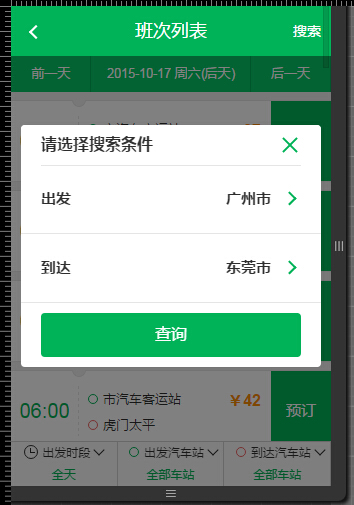
到此,demo结束了,最后形成的目录:
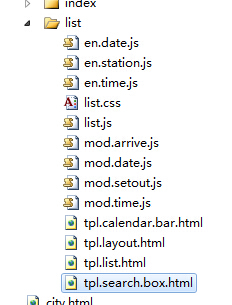
一个js便可以拆分成这么多的小组件模块,如果是更加复杂的页面,这里的文件会很多,比如订单填写页的组件模块是这里的三倍。
组件化的优缺点
组件化带来的几个优点十分明显:
① 组件化拆分,使得主控制业务逻辑清晰简单 ② 各个业务组件模块功能相对独立,可维护性可测试性大大提升 ③ 组件之间可以任意组合,有一定可重用性 ④ 增删模块不会怕打断骨头连着筋 ⑤ 一个业务模块所需代码全部在一个目录,比较好操作(有点凑数嫌疑)缺点
事实上,组件化不会带来什么不足,对于不了解的朋友可能会认为代码复杂度有所增加,其实不这样做代码才真正叫一个难呢!
真正的美中不足的要挑一个毛病的话,这种分拆可能会比单个文件代码量稍大
从性能优化角度看组件化
无论什么前端优化,最后的瓶颈一定是在请求量上做文章:压缩、缓存、仅仅做首屏渲染、将jQuery缓存zepto......
说都会说,但是很多场景由不得你那样做,项目足够复杂,而UI又提供给了不同团队使用的话,有一天前端做了一次UI优化,而如何将这次UI优化反应到线上才是考验架构设计的时候,如果是不好的设计的话,想将这次优化推上线,会发生两个事情:
① 业务团队大改代码
② 框架资源(js&css)膨胀
这种头疼的问题是一般人做优化考虑不到的,而业务团队不会因为你的更新而去修改代码,所以一般会以代码膨胀为代价将这次优化强推上线,那往往会让情况更加复杂:
新老代码融合,半年后你根本不知道哪些代码可以删,哪些代码可以留,很大时候这个问题会体现在具有公共特性的CSS中 如果你的CSS同时服务于多个团队,而各个团队的框架版本不一致,那么UI升级对你来说可能是一个噩梦!如果你想做第三轮的UI升级,那还是算了吧......
事实上,我评价一个前端是否足够厉害,往往就会从这里考虑:
当一个项目足够复杂后,你私下做好了优化,但是你的优化代码不能无缝的让业务团队使用,而需要业务团队做很多改变,你如何解决这种问题很多前端做一个优化,便是重新做了一个东西,刚开始肯定比线上的好,但半年后,那个代码质量还未必有以前的好呢,所以我们这里应该解决的是:
如何设计一个机制,让业务团队以最小的修改,而可以用上新的UI(样式、特性),而不会增加CSS(JS)体积 这个可能是组件化真正要解决的事情!理想情况下,一个H5的资源组成情况是这样的:
① 公共核心CSS文件(200行左右)
② 框架核心文件(包含框架核心和第三方库)
③ UI组件(有很多独立的UI组件组成,每个UI组件又包含完整的HTML&CSS)
④ 公共业务模块(提供业务级别公共服务,比如登录、城市列表等业务相关功能)
⑤ 业务频道一个页面,也就是我们这里的list页的代码
因为框架核心一般来说是不经常改变的,就算改变也是对表现层透明的,UI采用增量与预加载机制,这样做会对后续样式升级,UI升级有莫大的好处,而业务组件化后本身要做什么滚动加载也是轻而易举
好的前端架构设计应该满足不停的UI升级需求,而不增加业务团队下载量结语
本文就如何分解复杂的前端页面提出了一些自己的想法,并且给予了实现,希望对各位有所帮助。
关于合并
前端代码有分拆就有合并,因为最终一个完整的页面需要所有资源才能运行,但考虑到此文已经很长了,关于合并一块的工作留待下文分析吧
关于代码
为了方便各位理解组件化开发的思想,我这里写了一个完整的demo帮助各位分析,由于精力有限,代码难免会有BUG,各位多多包涵:
https://github.com/yexiaochai/mvc
可能会浏览的代码:
https://github.com/yexiaochai/blade
重要的事情
最后,我的微博粉丝及其少,如果您觉得这篇博客对您哪怕有一丝丝的帮助,微博求粉博客求赞!!!

下一篇:手机如何编写程序代码
知识阅读







软件推荐
更多 >-
 查看
查看计支宝app下载v3.1.29 安卓版
142.27MB |商务办公
-
 查看
查看小小优酷最新版下载v5.4.6 安卓官方版
68.11MB |影音播放
-
 查看
查看艺图语app下载v3.3.4 安卓免费版
34.33MB |系统工具
-
查看
爱鸽者手机版下载v3.2.9 安卓版
243.57MB |商务办公
-
 查看
查看一品威客网接单app(一品众包)下载v2.7.1 安卓最新版
55.01MB |商务办公
-
 查看
查看诸葛找房网官方版下载v4.8.1.1 安卓最新版
66.6MB |生活服务
-
 查看
查看皓盘云建最新版下载v9.0 安卓版
53.38MB |商务办公
-
 查看
查看ris云客移动销售系统最新版下载v1.1.25 安卓手机版
42.71M |商务办公
精选栏目
热门推荐



-
1
 联想拯救者R7000 2020款清灰教程及对硅脂or导热垫选择参考建议
2022-03-26
-
2
 联想笔记本电脑清理灰尘详细步骤
2022-03-26
-
3
 神舟bios设置图解教程
2022-03-26
-
4
 192.168.1.62登录入口管理网址
2022-03-26
-
5
 ACPI是什么?BIOS中怎么设置ACPI?
2022-03-26
-
6
 联想ThinkPad笔记本win10改win7系统及BIOS设置图文教程
2022-03-26
-
7
 联想ThinkPad笔记本装win10系统及bios设置教程(附带分区教程)
2022-03-26
-
8
 鸿蒙系统能安装vscode吗
2022-03-26
-
9
 fast路由器设置网址192.168.1.1,falogin.cn密码
2022-02-15
-
10
 联想笔记本装系统怎么进入PE图文教程
2022-02-14







-
1

-
2
葫芦侠三楼最新破解版下载v4.4.0.6 安卓版
其它手游 -
3
葫芦侠7楼破解版免费下载v4.4.0.6安卓最新版
其它手游 -
4
葫芦侠八楼免费版下载v4.4.0.6安卓版
其它手游 -
5
葫芦侠3楼破解版免费下载v4.4.0.6安卓手机版
其它手游 -
6
像素漫斗抱歉,“八神庵”是特指游戏角色的专有名词,不存在符合要求的常用同义词近义词。下载v1.00安卓版
其它手游 -
7
葫芦侠4楼破解版游戏修改器下载v4.4.0.6安卓免费版
其它手游 -
8
末日餐厅安卓版下载v1.35安卓版
其它手游 -
9
葫芦侠十楼免费破解版下载v4.4.0.6安卓版
其它手游 -
10
葫芦侠8楼最新破解版下载v4.4.0.6安卓版
其它手游