学无止境之小白学java……第011天
发表时间:2022-03-25来源:网络
学习主题:数组深化
对应视频:
http://www.itbaizhan.cn/course/id/85.html
对应作业:
1. DateFormat和SimpleDateFormat类
(1) DateFormat与SimpleDateFormat的关系:(父子关系)
DateFormat是一个抽象类,一般使用它的的子类SimpleDateFormat类来实现。
(2)DateFormat类的作用:把时间对象转化成指定格式的字符串。反之,把指定格式的字符串转化成时间对象。
2. Calendar类
(1) 如何获得一个Calender类的对象?
Calendar 类是一个抽象类,为我们提供了关于日期计算的相关功能,比如:年、月、日、时、分、秒的展示和计算。
GregorianCalendar 是 Calendar 的一个具体子类,提供了世界上大多数国家/地区使用的标准日历系统。通过子类获得一个Calendar类的对象。
(2)列举出Calender类中五个常用的方法:
1、add(int field,int amount) —— 根据日历的规则,为给定的日历字段添加或减去指定的时间量。2、get(int field) —— 返回给定日历字段的值。3、getinstance() —— 使用默认市区和语言环境获得一个日历。4、getTime() —— 返回一个表示此 Calendar 时间值(从历元至现在的毫秒偏移量)的 Date 对象。5、set(int field,int value) —— 将给定的日历字段设置为给定值。6、setTime() —— 使用给定的 Date 设置此 Calendar 的时间。 import java.text.DateFormat; import java.text.ParseException; import java.text.SimpleDateFormat; import java.util.Calendar; import java.util.Date; import java.util.GregorianCalendar; import java.util.Scanner; public class Test { public static void main(String[] args) throws ParseException { Scanner input = new Scanner(System.in); System.out.println("请输入 一个日期:yyyy-MM-dd"); String str = input.next(); //创建DateFormat对象,用于将string转为date DateFormat df = new SimpleDateFormat("yyyy-MM-dd"); Date d=df.parse(str); //将Date对象所表示的时间设置到Calendar中 Calendar cal = new GregorianCalendar(); cal.setTime(d); //获取输入中的日期中的date部分 int nowDate = cal.get(Calendar.DAY_OF_MONTH); //将日期设置为1号 cal.set(Calendar.DAY_OF_MONTH,1); //获取1号是星期几? int dayOfWeek = cal.get(Calendar.DAY_OF_WEEK); //System.out.println(dayOfWeek); System.out.println("日\t一\t二\t三\t四\t五\t六"); for(int i=1;i3. Math类
(1) 列举出Math类的五个常用方法:
Math.abs 取绝对值Math.ceil 向上取整Math.floor 向下取整Math.max /Math.min 取最大/最小值Math.pow 幂次方Math.random [0,1)之间的随机数Math.round 四舍五入Math.sqrt 开方(2) 如何进行静态导入
import static java.lang.Math.*;
方法的类名在代码中就可以省略不写
4. File类
(1) File类的作用
1、 可以实现获取文件中和目录属性等功能2、 可以实现对文件和目录的创建、删除等功能(2) File类操作目录与文件的常用方法
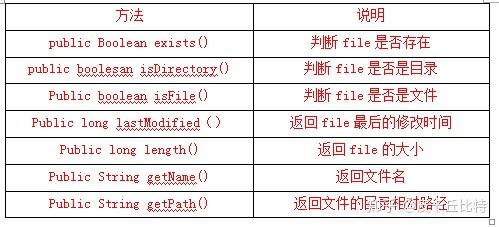
对应视频:
http://www.itbaizhan.cn/course/id/85.html
对应作业
1. 使用递归算法遍历目录结构和树结构
(1)递归算法:是一种解决问题的方法,即把问题简单化。递归的思想就是“自己调用自己”,一个使用递归技术的方法将会直接或间接的调用自己。
(2) 使用递归算法遍历目录结构和树结构的原理
import java.io.File; public class TestFile { public static void main(String[] args) { File f = new File("D:\\workspace"); printFile(f,0); } public static void printFile(File file,int level){ //打印树状结构的层次关系 for(int i=0;i 0) { this.elementData = new Object[initialCapacity]; //this.elementData=new Object[20]; } } (3)添加方法 add(Object obj) public boolean add(E e) { //检测空间容量是否够用 ensureCapacityInternal(size + 1); // Increments modCount!! //添加元素 elementData[size]=e; size++; elementData[size++] = e; return true; } (4)检测空间容量是否够用 private void ensureCapacityInternal(int minCapacity) { ensureExplicitCapacity(calculateCapacity(elementData, minCapacity)); } 首先调用执行 ,计算容量 calculateCapacity(elementData, minCapacity) //calculateCapacity方法定义 private static int calculateCapacity(Object[] elementData, int minCapacity) { //以下代码相当于elementData=={} if (elementData == DEFAULTCAPACITY_EMPTY_ELEMENTDATA) { //true //Math.max(10,1); return Math.max(DEFAULT_CAPACITY, minCapacity); } return minCapacity; //执行完之后的结果为 10 } //容量计算完毕后,执行ensureExplicitCapacity方法 ensureExplicitCapacity(10) ensureExplicitCapacity方法定义 private void ensureExplicitCapacity(int minCapacity) { //10 modCount++; // overflow-conscious code * 10-0 >0 true if (minCapacity - elementData.length > 0) grow(minCapacity); } (5)扩充容量 private void grow(int minCapacity) { //10 // overflow-conscious code int oldCapacity = elementData.length; //int oldCapactiy=0; int newCapacity = oldCapacity + (oldCapacity >> 1); //int newCapacity=0+0>>1 结果为0 if (newCapacity - minCapacity < 0) // 0-10知识阅读








软件推荐
更多 >-
 查看
查看计支宝app下载v3.1.29 安卓版
142.27MB |商务办公
-
 查看
查看小小优酷最新版下载v5.4.6 安卓官方版
68.11MB |影音播放
-
 查看
查看艺图语app下载v3.3.4 安卓免费版
34.33MB |系统工具
-
查看
爱鸽者手机版下载v3.2.9 安卓版
243.57MB |商务办公
-
 查看
查看一品威客网接单app(一品众包)下载v2.7.1 安卓最新版
55.01MB |商务办公
-
 查看
查看诸葛找房网官方版下载v4.8.1.1 安卓最新版
66.6MB |生活服务
-
 查看
查看皓盘云建最新版下载v9.0 安卓版
53.38MB |商务办公
-
 查看
查看ris云客移动销售系统最新版下载v1.1.25 安卓手机版
42.71M |商务办公




-
1

-
2
葫芦侠三楼最新破解版下载v4.4.0.6 安卓版
其它手游 -
3
葫芦侠7楼破解版免费下载v4.4.0.6安卓最新版
其它手游 -
4
葫芦侠八楼免费版下载v4.4.0.6安卓版
其它手游 -
5
葫芦侠3楼破解版免费下载v4.4.0.6安卓手机版
其它手游 -
6
像素漫斗抱歉,“八神庵”是特指游戏角色的专有名词,不存在符合要求的常用同义词近义词。下载v1.00安卓版
其它手游 -
7
葫芦侠4楼破解版游戏修改器下载v4.4.0.6安卓免费版
其它手游 -
8
末日餐厅安卓版下载v1.35安卓版
其它手游 -
9
葫芦侠十楼免费破解版下载v4.4.0.6安卓版
其它手游 -
10
葫芦侠8楼最新破解版下载v4.4.0.6安卓版
其它手游