JavaWeb新手小项目以及源码
发表时间:2022-03-23来源:网络
此项目主要实现的功能有:
jsp连接数据库、MD5加密、验证码验证、Ajax、文件的上传与下载、session登录验证等。
先来几张截图: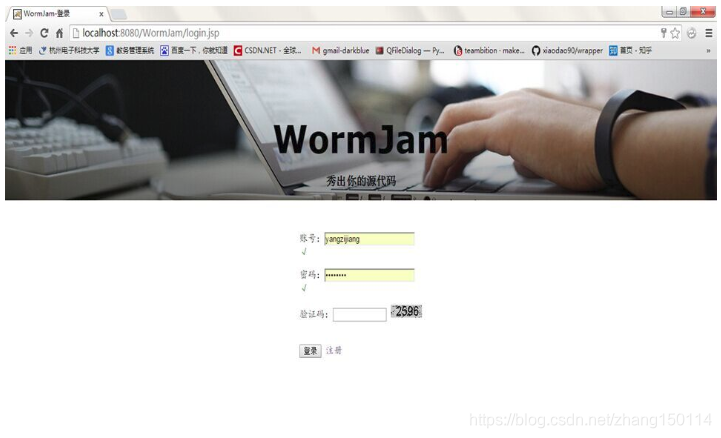
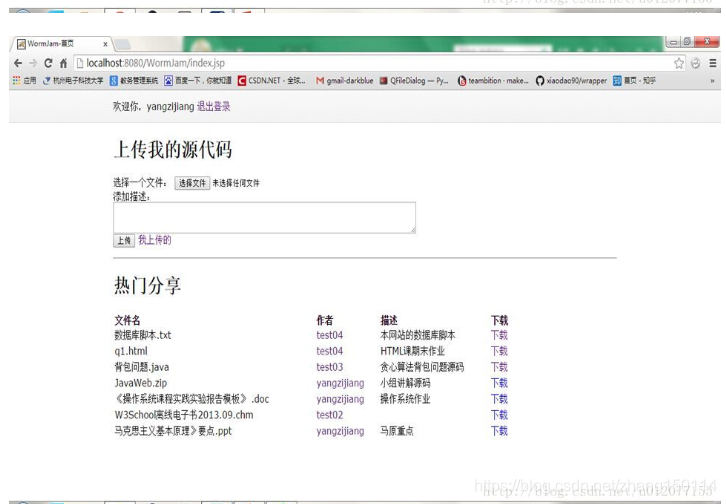
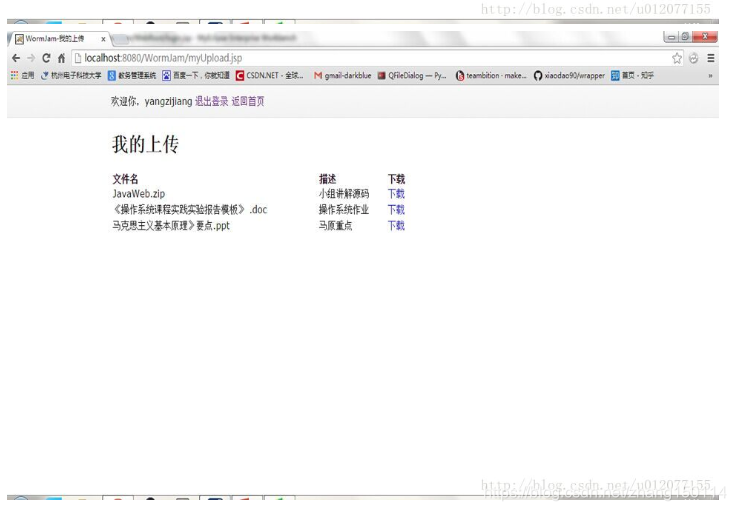
一、首先写登录页面 login.jsp
WormJam-登录 WormJam秀出你的源代码
账号:密码:
验证码:
注册 //验证账号密码格式 function accountChange(){ var str = loginForm.account.value; var reg = /[a-zA-Z0-9]{6,16}/; if(reg.test(str)){ accountText.innerHTML = "√"; accountText.style.color = "green"; } else{ accountText.innerHTML = "账号为6至16位数字或字母!"; accountText.style.color = "red"; } } function passwordChange(){ var str = loginForm.password.value; var reg = /^[x00-x7f]+$/; if(reg.test(str) && str.length>5 && str.length
在首页,可以上传文件,然后再热门分享中把所有文件以及上传文件的作者列出来。我这里没有遍历文件夹来列出文件,而是在上传文件的同时记录到数据库。因此还应建立上传文件的DAO类。
十七、VO类UploadFile.java:
package VO; public class UploadFile { //用户上传文件的类 private String account; private String fileName; private String description; public String getAccount(){ return account; } public void setAccount(String account){ this.account = account; } public String getFileName(){ return fileName; } public void setFileName(String fileName){ this.fileName = fileName; } public String getDescription(){ return description; } public void setDescription(String description){ this.description = description; } }定义了文件名,作者及描述。
十八、DAO标准类IUploadFileDAO.java:
package DAO; import java.util.* ; import VO.UploadFile; public interface IUploadFileDAO { public boolean doCreate(UploadFile file) throws Exception; //写入 public List findByAccount(String account) throws Exception; //按账号查找文件 public List findAll() throws Exception; //列出所有文件 }十九、真实主题实现类UploadFileDAOImpl.java:
package DAO ; import java.util.* ; import java.sql.* ; import DAO.IUploadFileDAO; import VO.UploadFile; public class UploadFileDAOImpl implements IUploadFileDAO { private Connection conn = null; //数据库连接对象 private PreparedStatement pstmt = null; //数据库操作对象 public UploadFileDAOImpl(Connection conn){ //通过构造方法取得数据库连接 this.conn = conn; } public boolean doCreate(UploadFile file) throws Exception{ //添加账户 boolean flag = false; //定义标志位 String sql = "INSERT INTO FILES(acname,file,descript) VALUES (?,?,?)"; this.pstmt = this.conn.prepareStatement(sql); //实例化PrepareStatement对象 this.pstmt.setString(1,file.getAccount()); this.pstmt.setString(2,file.getFileName()); this.pstmt.setString(3, file.getDescription()); if(this.pstmt.executeUpdate() > 0){ //如果有更新操作 flag = true ; } this.pstmt.close() ; return flag ; } public List findByAccount(String acname) throws Exception{//按账号查找密码 List all = new ArrayList(); String sql = "SELECT FILE,descript FROM FILES WHERE acname=?" ; this.pstmt = this.conn.prepareStatement(sql) ; this.pstmt.setString(1,acname); ResultSet rs = this.pstmt.executeQuery() ; UploadFile file = null; while(rs.next()){ file = new UploadFile(); file.setFileName(rs.getString(1)); file.setDescription(rs.getString(2)); all.add(file); } this.pstmt.close(); return all; } public List findAll() throws Exception { //查找所有 List all = new ArrayList(); String sql = "SELECT * FROM FILES"; this.pstmt = this.conn.prepareStatement(sql) ; ResultSet rs = this.pstmt.executeQuery() ; UploadFile file = null; while(rs.next()){ file = new UploadFile(); file.setAccount(rs.getString(1)); file.setFileName(rs.getString(2)); file.setDescription(rs.getString(3)); all.add(file); } this.pstmt.close(); return all; } }二十、代理主题实现类UploadFileDAOProxy:
package DAO ; import java.util.* ; import java.sql.* ; import DAO.UploadFileDAOImpl; import DAO.IUploadFileDAO; import dbc.DatabaseConnection; import VO.UploadFile; public class UploadFileDAOProxy implements IUploadFileDAO { private DatabaseConnection dbc = null ; private IUploadFileDAO dao = null ; public UploadFileDAOProxy() throws Exception { //在构造方法中实例化连接,同时实例化dao对象 this.dbc = new DatabaseConnection() ; this.dao = new UploadFileDAOImpl(this.dbc.getConnection()) ; } public boolean doCreate(UploadFile file) throws Exception{ boolean flag = false ; try{ flag = this.dao.doCreate(file) ; }catch(Exception e){ throw e ; }finally{ this.dbc.close() ; } return flag ; } public List findByAccount(String acname) throws Exception{ List all = null; try{ all = this.dao.findByAccount(acname) ; }catch(Exception e){ throw e ; }finally{ this.dbc.close() ; } return all ; } public List findAll() throws Exception{ List all = null; try{ all = this.dao.findAll() ; }catch(Exception e){ throw e ; }finally{ this.dbc.close() ; } return all ; } }然后就可以上传文件了,并且上传成功后会把文件名,作者,和描述保存在数据库。上传文件需要用到jsmartcom包,而且我在解决上传的文件名乱码这一块花了很长时间,注意,我的项目里所使用的都是utf-8编码。有些jsmartcom包不支持中文,可以下载到别人改过的支持中文的包。
二十一、上传文件用UploadServlet:
package servlets; import java.io.IOException; import java.io.PrintWriter; import java.util.ArrayList; import factory.DAOFactory; import VO.UploadFile; import javax.servlet.ServletException; import javax.servlet.http.HttpServlet; import javax.servlet.http.HttpServletRequest; import javax.servlet.http.HttpServletResponse; import javax.servlet.Re; import javax.servlet.ServletConfig; import javax.servlet.http.HttpSession; import com.jspsmart.upload.File; import com.jspsmart.upload.SmartUpload; import com.jspsmart.upload.SmartUploadException; public class UploadServlet extends HttpServlet { //上传文件时的处理 public void doPost(HttpServletRequest request, HttpServletResponse response) throws ServletException, IOException { UploadFile uploadfile = new UploadFile(); HttpSession session = request.getSession(); String account = (String)session.getAttribute("account"); //获取session中的用户名 uploadfile.setAccount(account); SmartUpload smartUpload = new SmartUpload(); ServletConfig config = this.getServletConfig(); smartUpload.initialize(config, request, response); try{ smartUpload.upload(); String text = smartUpload.getRequest().getParameter("text"); uploadfile.setDescription(text); File smartFile = smartUpload.getFiles().getFile(0); String fileName = smartFile.getFileName(); smartFile.saveAs("/files/" + fileName,smartUpload.SAVE_VIRTUAL); request.setAttribute("msg", "上传成功!"); uploadfile.setFileName(fileName); DAOFactory.getIUploadFileDAOInstance().doCreate(uploadfile); }catch(SmartUploadException e){ request.setAttribute("msg", "上传失败!"); e.printStackTrace(); } catch (Exception e) { request.setAttribute("msg", "上传失败!"); e.printStackTrace(); } Re rd = request.getRe("/index.jsp"); rd.forward(request, response); } }需注意,session中的用户名是在登录成功时设置的,我用一个session登录验证的过滤器来确保用户只有在登录的时候能够访问主页等页面,不然跳到登录页面:
二十二、LoginFilter:
package filters; import javax.servlet.http.HttpServlet; import java.io.IOException; import javax.servlet.Filter; import javax.servlet.FilterChain; import javax.servlet.FilterConfig; import javax.servlet.ServletException; import javax.servlet.ServletRequest; import javax.servlet.ServletResponse; import javax.servlet.http.HttpServletRequest; import javax.servlet.http.HttpSession; public class LoginFilter implements Filter { //登录验证过滤器 public void init(FilterConfig config) throws ServletException{} public void doFilter(ServletRequest request,ServletResponse response, FilterChain chain) throws IOException,ServletException{ HttpServletRequest req = (HttpServletRequest)request; HttpSession ses = req.getSession(); if(ses.getAttribute("account")!=null){ chain.doFilter(request, response); }else{ request.getRe("login.jsp").forward(request, response); } } public void destroy(){} }而点击页面上方的”退出登录“时,就要删除session中的用户,并跳到登录页:
二十三、loginOut.jsp:
二十四、最后,还有点击”我的上传“和“他的上传”的页面:myUpload.jsp:
WormJam-我的上传 退出登录 返回首页我的上传
文件名 描述 下载hisUpload.jsp:
WormJam-他的上传 退出登录 返回首页 文件名 描述 下载最后补充一点,点击下载时会新开一个页面显示文件的内容,而右键“下载”点击“链接另存为”时才会下载,特别是如果文件是zip等不能查看的类型就会出错。也有使点击就能下载的方法,我比较懒就没去试了。
转载自原创:https://blog.csdn.net/u012077155/article/details/43115507
x00-x7f ↩︎
上一篇:java五子棋代码详解
下一篇:Java新手学习
知识阅读






软件推荐
更多 >-
 查看
查看计支宝app下载v3.1.29 安卓版
142.27MB |商务办公
-
 查看
查看小小优酷最新版下载v5.4.6 安卓官方版
68.11MB |影音播放
-
 查看
查看艺图语app下载v3.3.4 安卓免费版
34.33MB |系统工具
-
查看
爱鸽者手机版下载v3.2.9 安卓版
243.57MB |商务办公
-
 查看
查看一品威客网接单app(一品众包)下载v2.7.1 安卓最新版
55.01MB |商务办公
-
 查看
查看诸葛找房网官方版下载v4.8.1.1 安卓最新版
66.6MB |生活服务
-
 查看
查看皓盘云建最新版下载v9.0 安卓版
53.38MB |商务办公
-
 查看
查看ris云客移动销售系统最新版下载v1.1.25 安卓手机版
42.71M |商务办公
精选栏目
热门推荐


-
1
 联想小新Air 14笔记本重装系统WIN10教程(重装win10专业版)
2022-03-26
-
2
 联想笔记本电脑清理灰尘详细步骤
2022-03-26
-
3
 神舟bios设置图解教程
2022-03-26
-
4
 192.168.1.62登录入口管理网址
2022-03-26
-
5
 ACPI是什么?BIOS中怎么设置ACPI?
2022-03-26
-
6
 联想ThinkPad笔记本win10改win7系统及BIOS设置图文教程
2022-03-26
-
7
 联想ThinkPad笔记本装win10系统及bios设置教程(附带分区教程)
2022-03-26
-
8
 鸿蒙系统能安装vscode吗
2022-03-26
-
9
 fast路由器设置网址192.168.1.1,falogin.cn密码
2022-02-15
-
10
 联想笔记本装系统怎么进入PE图文教程
2022-02-14




-
1

-
2
葫芦侠三楼最新破解版下载v4.4.0.6 安卓版
其它手游 -
3
葫芦侠7楼破解版免费下载v4.4.0.6安卓最新版
其它手游 -
4
葫芦侠八楼免费版下载v4.4.0.6安卓版
其它手游 -
5
葫芦侠3楼破解版免费下载v4.4.0.6安卓手机版
其它手游 -
6
像素漫斗抱歉,“八神庵”是特指游戏角色的专有名词,不存在符合要求的常用同义词近义词。下载v1.00安卓版
其它手游 -
7
葫芦侠4楼破解版游戏修改器下载v4.4.0.6安卓免费版
其它手游 -
8
末日餐厅安卓版下载v1.35安卓版
其它手游 -
9
葫芦侠十楼免费破解版下载v4.4.0.6安卓版
其它手游 -
10
葫芦侠8楼最新破解版下载v4.4.0.6安卓版
其它手游